
Virtual Front Panel
This product has been retired with no direct replacement.
A software front panel for Gamry potentiostats: direct access to the instrument for quick, simple experiments, the way a manual front panel worked.
This page is kept as archival reference for existing owners — it is not available for purchase.
Product Details
Overview
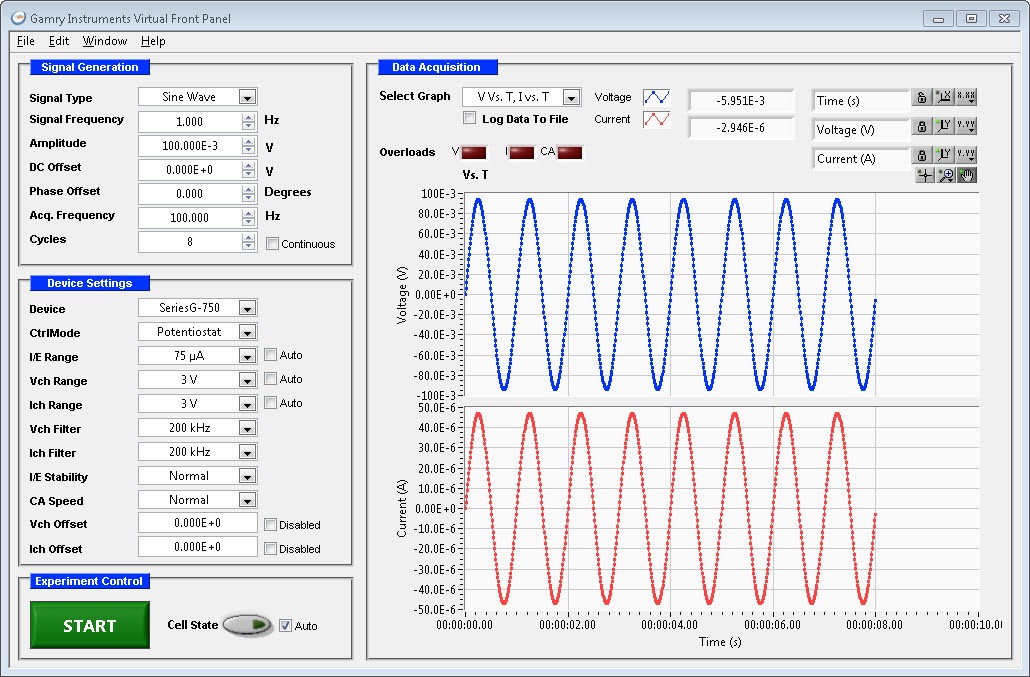
The Virtual Front Panel Software allows the user to control the research-grade Gamry Potentiostat much like a manual potentiostat with a front panel. The program gives you quick access to all of the features of the potentiostat including signal generation, current range, filtering and stability. It offers potentiostatic, galvanostatic, and ZRA modes. Virtual Front Panel is ideal for long-term potentiostatic or galvanostatic polarization tests or simple charge-discharge experiments with batteries. You can perform cyclic voltammetry at a wide range of scan rates. Data can be plotted in a linear or a log format. Several signal waveforms are available for investigation of different techniques.
Virtual Front Panel is a standalone program and does not use the Gamry Framework Software to operate. It is well suited for schools, colleges and learning laboratories, where quick access to instrument features and on-the-fly adjustment of parameters are beneficial.
System Requirements
- Gamry Reference or Interface Family Instrument or other USB-based instrument compatible with the Gamry Framework Software
- Microsoft® Windows™ 10 (64-bit) Required, Microsoft® Windows™ 11 (64-bit) Recommended
- 16 GB RAM Required, 32 GB RAM Recommended
Features
Control Modes
Virtual Front Panel can operate the potentiostat in Potentiostat, Galvanostat, and ZRA modes.
Signal Generation
The user has control over the signal type (sine, cosine, triangle, square, saw, ramp, single point, and user defined). Data acquisition rate is controlled up to 4kHz (depending on computer performance) and the maximum signal frequency is half of the acquisition rate. Amplitude, DC offset, phase offset, and cycles are also user-adjustable.
Device Settings
The potentiostat can be selected. Full control over Ich, Vch and I/E range, as well as autoranging are selectable. For stability adjustments the user can change the I/E stability and Control Amplifier speed, and both the Ich and Vch filters are adjustable.
Data Display Formats
Data is displayed in real-time, and can be plotted as I vs. V, V vs. I, or both I and V vs. Time. Linear and Log views are available. Data can be logged to a file for importing into plotting programs.
Manuals, downloads, and support
Still running the Virtual Front Panel? Our team continues to support discontinued instruments — reach out for help, calibration, or migration guidance.
Contact support